
Last week, I was fortunate to have my employer send me to UCLA’s Technical Management Program, where I spent 8 hours a day studying various leadership-related topics. One of my selections was a course on “AI-Powered Management,” and I left the week energized to try an experiment on my to-do list: vibe coding a relatively complete game. I picked my memory of a home computer version of a classic 1980s arcade game, and then spent about 6 hours iterating with a bot named Claude.
Before I go on, I realize there is a lot of concern about AI. As a software leader in a highly creative industry, I acknowledge that there are serious human, ethical, and legal considerations about AI. As a pragmatist, it's clear that if I want to continue growing in a conventional path, I need to understand the capabilities and limitations of these tools. As a nerd, I wanted to start poking the buttons and see what it could do.
Anyway, here’s my Weird Clone With Rules I Mostly Made Up…
Daring Dangle
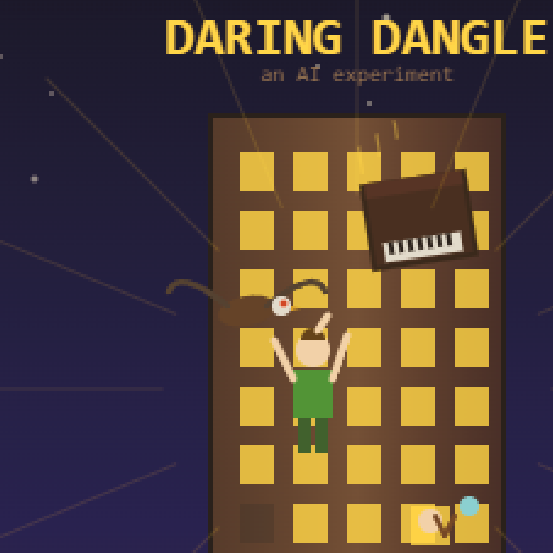
This is a game where you use WASD to scale the outside of a skyscraper, as more and more weird obstacles and residents try to hurl you to the unforgiving pavement below. You can partially, but not completely, climb over windows, while some obstacles fly at you from various directions and others are more stationary or stealthy. Look, I’m not getting any awards for this, but it was a game I enjoyed as a kid with a small enough set of mechanics to test out. If you’d rather play the game than read a summary, try it here. Then lie to me and say you played it TOO, not INSTEAD.
How it went down, condensed version
All together, I spent around 6 hours going back and forth with a prompt. The music and font are from royalty-free libraries I’ve purchased, but every stitch of art, code, and SFX were generated by prompts.
- First, I informed Claude that we were going to refine my raw thoughts into a project brief, including some steps on how we’d proceed with implementation. I’ll talk very briefly about this again at the end.
- Then, I used the brief to start the project.
- I went back and forth with Claude on the art style and representations of all the player objects and obstacles named in the brief.
- Claude generated some potential wireframes and asked miscellaneous control and setup questions. I selected one and continued.
- The overall project was constructed as a WebGL/Canvas app at that point, and delivered in a ZIP file.
- I’d initially planned to iterate locally, but was encountering security issues running from a local file in my browser, so I jumped ahead and started deploying to and testing from the web.
- First, we got basic movement and level generation started.
- And iterated. Kind of a few times. But eventually got it mostly right, or at least enough to keep testing.
- This is where I realized I needed some cheat options. You need to be able to have invincibility, infinite lives, fast motion, and things like that if you want to be able to test various mechanics without literally playing through the whole game every time!
- Then I went through the various obstacle types and scoring system.
- This was the bulk of the work. Many of the various obstacles were misinterpreted partially and took some refining.
- Somewhere in the middle of this, I realized Sonnet was generating a whole lot of rework due to basic errors, like introducing syntax issues with faulty replace. I had the bot summarize work to this point and switched over to Opus. I should have started with that really.
- I kept adding cheats as I went. By the way, they’re still in there. Old-school gamers will be able to figure out how to toggle them.
- I added and adjusted difficulty scaling here.
- There were also fundamental issues with the level generation and this was a good time to fix them.
- There were still a bunch of general rendering glitches to fix.
- Then I polished up some UI — help screen, easy access to high scores, and added the “click to start” screen.
- Why click to start? You have to click interactively before the audio code can work, due to browser restrictions and how this particular kit was implemented. Besides, it gave me a place to later stick a hero image.
- The hero image has all kinds of glitches, and that amused me enough to keep it.
- I sent it to friends. They caught a few more issues. I iterated on those.
There’s no “12. ? 13. Profit!” here. But I had a finished game that’s relatively complete. It took domain expertise (I’ve been working on video games for the majority of a couple decades) but I didn’t write code directly even once.
Lessons Learned
I said I’d come back to the planning idea. I was experimenting with a couple of methods recommended to me by various folks. By starting with a plan, the AI was conditioned to a set of assumptions about the upcoming work that improved the context it was operating within and producing better results. By adding roles along the way, the AI knew if it was trying to act as a project architect, coder, or designer. One of these was successful…
Afterwards, I asked for a rewritten brief that would be likely to generate a successful redo, and then requested a retrospective. I’ll let Claude wrap it up for me:
Building a 5,700-line browser game with AI taught us that a detailed design spec beats any prompting trick. Our most expensive bugs — each taking 2-3 fix attempts — all came from assumptions we didn’t write down: which direction things scroll, how tall the player is for collision purposes, and how fast humans tap keys. Stating requirements as testable rules (“the player must never spawn somewhere they’d immediately die”) rather than vague features (“add safe respawn”) would have cut our debugging time by nearly half. Describing bugs by specific symptom rather than impression, batching small fixes into single requests, and testing core physics before building features on top of them kept the process moving. Fancy role prompts like “you are a senior game developer” added nothing — the spec was already doing that job.